This article explains how emails sent from GRATIS appear to venues and clients.
Emails sent to venues
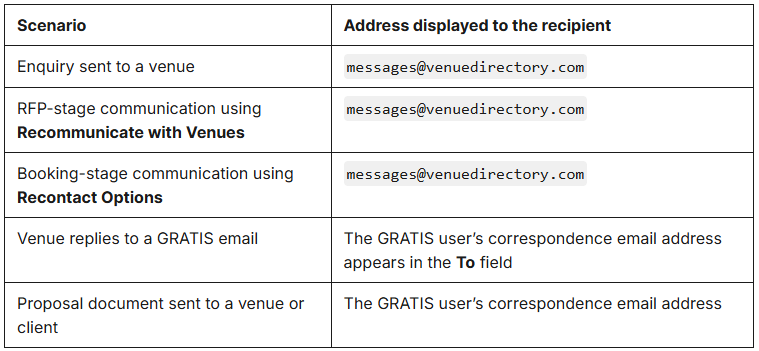
When a GRATIS user sends an enquiry to one or more venues, the venue receives an email from messages@venuedirectory.com.
The same sender address is used when the user communicates with venues through either of the following options:
- Recommunicate with Venues during the RFP stage
- Recontact Options during the booking stage
If a venue selects Reply, the To field is automatically populated with the GRATIS user’s correspondence email address. This allows the venue to see exactly which inbox their reply will be sent to.
Proposal documents sent to venues and clients
When a GRATIS user sends a proposal document from GRATIS to a venue or client, the email is sent using the user’s correspondence email address. Recipients will therefore see the user’s correspondence email address as the sender.
At a glance
Was this article helpful?
That’s Great!
Thank you for your feedback
Sorry! We couldn't be helpful
Thank you for your feedback
Feedback sent
We appreciate your effort and will try to fix the article