Important: You cannot unconvert a confirmed booking. If the booking has been confirmed, you’ll need to clone the booking and add the extra venues to the cloned enquiry instead.
If the booking is still unconfirmed, follow the steps below.
TABLE OF CONTENTS
- Step 1 – Unconvert the booking back to an enquiry
- Step 2 – Add the additional venues
- Step 3 – Re-send the enquiry only to new venues
Step 1 – Unconvert the booking back to an enquiry
- Open the relevant booking.
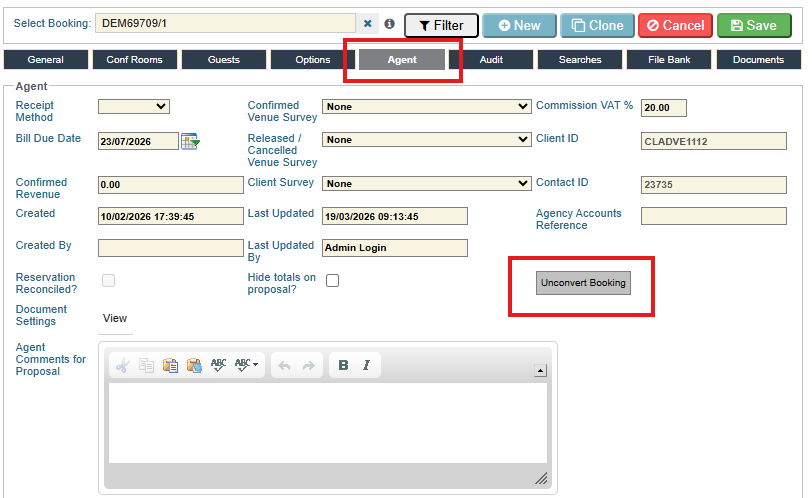
- Go to the Agent tab.
- Click Unconvert Booking.
- The booking will be moved back to an enquiry.
- See the highlighted Unconvert Booking button in the screenshot.
Step 2 – Add the additional venues
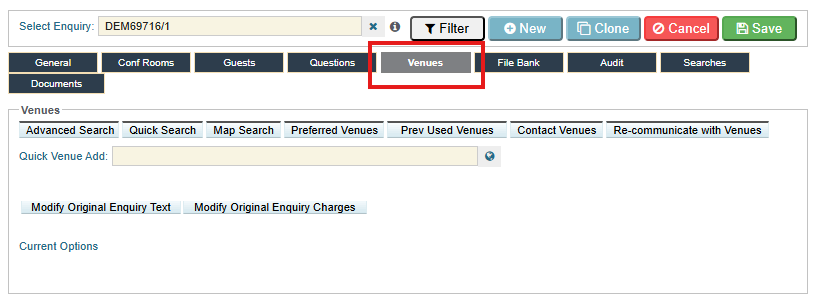
- Go to the Venues tab.
- Add the additional venues you want to include in the enquiry.
Step 3 – Re-send the enquiry only to new venues
- Still on the Venues tab, click Contact Venues.
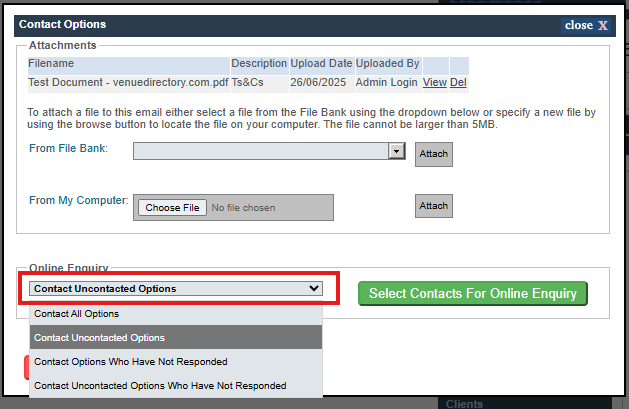
- In the Online Enquiry drop-down, select Contact Uncontacted Options.
- This ensures that only the newly added venues receive the enquiry email.
- Complete and send the enquiry as usual.
Was this article helpful?
That’s Great!
Thank you for your feedback
Sorry! We couldn't be helpful
Thank you for your feedback
Feedback sent
We appreciate your effort and will try to fix the article