Venues listed on www.venuedirectory.com that do not pay an annual subscription are known as B (basic) listings. These listings do not include images by default.
When you add a B-listed venue to a client proposal, no images will appear in the proposal document unless you upload one manually.
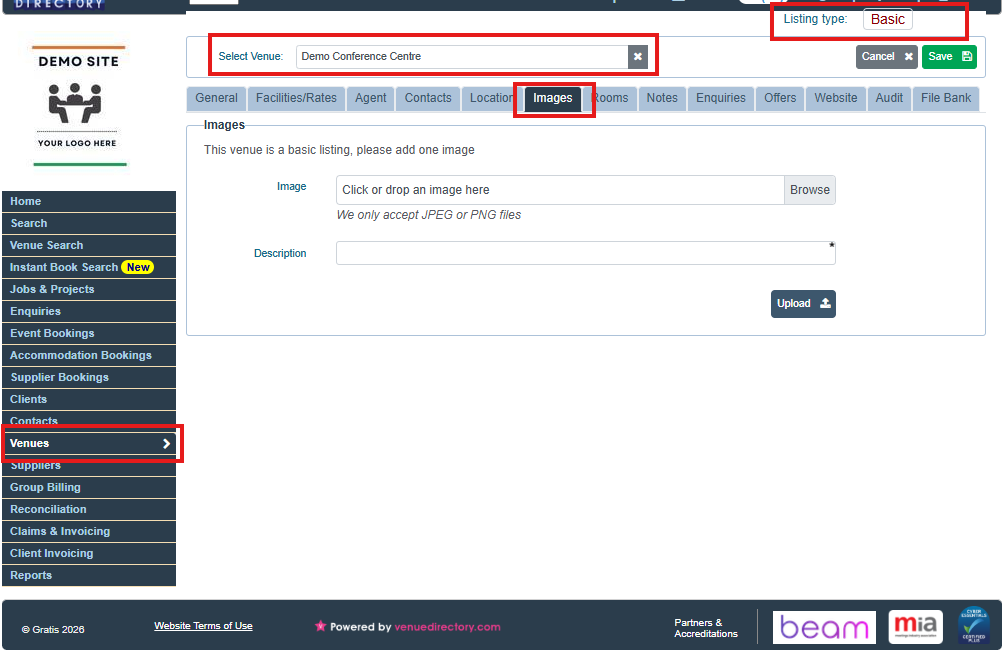
You can add your own image for a B-listed venue by following these steps:
- Open the Venues module
- Browse to the Venues module in your system.
- Find the B-listed venue - Search for and select the required venue.
- Confirm that the Listing type is set to Basic.
- Go to the Images tab
- Click Browse.
- Navigate to the folder where the image is saved on your computer.
- Select the image file and confirm the upload.
- Add a description to the image.
- Click Upload.
Once uploaded, the image will be available to appear in your client proposal for that B-listed venue.
Was this article helpful?
That’s Great!
Thank you for your feedback
Sorry! We couldn't be helpful
Thank you for your feedback
Feedback sent
We appreciate your effort and will try to fix the article