If a user reports that they are unable to log into your MyEventsPortal (client portal), check their contact record in GRATIS.
Cause
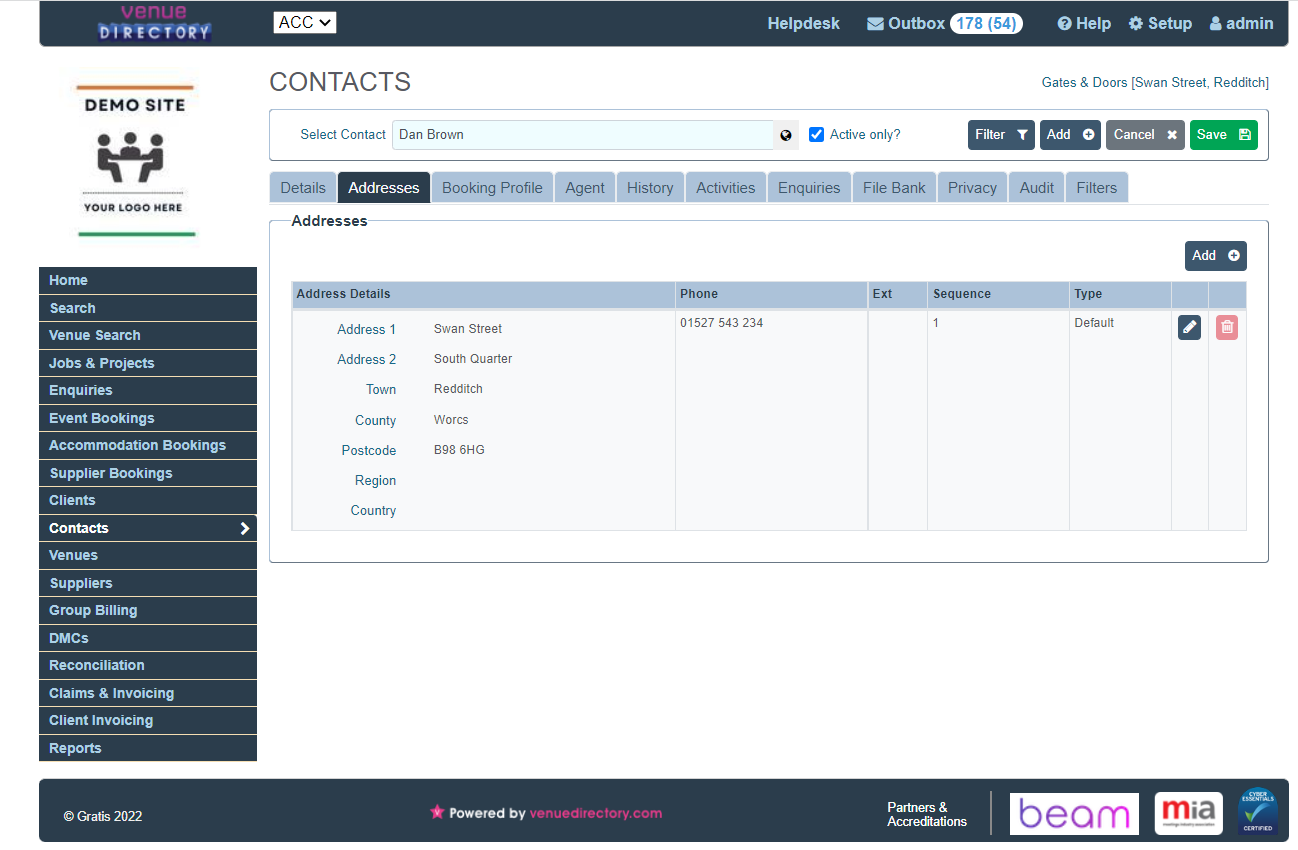
MyEventsPortal requires the contact to have a default address in GRATIS. If no default address is set, the user will be blocked from logging in.
Resolution
- Open the contact in GRATIS.
- Go to the contact’s Address section.
- Check that at least one address is added to the contact.
- Ensure one address is marked as the default.
- Save the contact record.
- Ask the user to try logging into the portal again.
Notes
- If the user still cannot log in after confirming a default address is set, verify you are checking the correct contact record (matching email address) and try again.
- Escalate with screenshots of the contact’s address section if the issue persists.
Was this article helpful?
That’s Great!
Thank you for your feedback
Sorry! We couldn't be helpful
Thank you for your feedback
Feedback sent
We appreciate your effort and will try to fix the article