If you are trying to create a client invoice but it is not appearing when you search in the Client Invoicing module, check the booking settings below:
- Browse to the relevant booking.
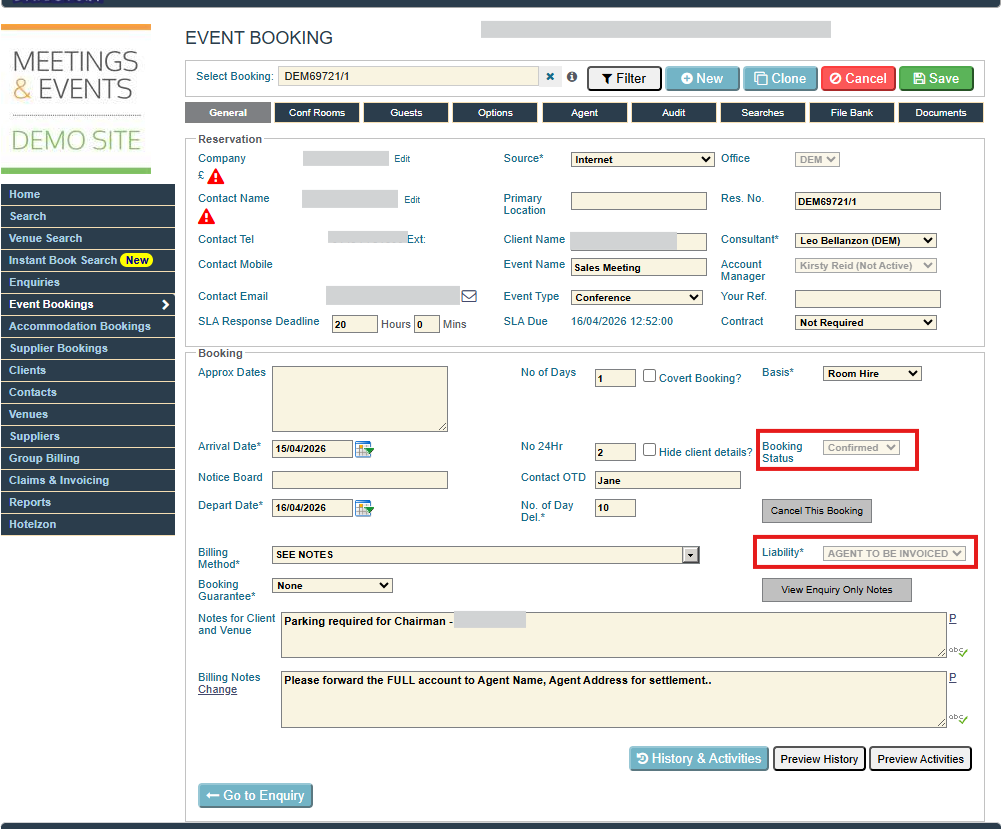
- Ensure that it's a Confirmed, Claimed or Paid booking.
- The booking must have a confirmed venue option.
- Confirm that the Liability is set to ‘Agent to be Invoiced’ or 'Agent CC Payment', and that the Billing Method is correct.
- Click Save, and the booking should then appear in the Client Invoicing module.
Was this article helpful?
That’s Great!
Thank you for your feedback
Sorry! We couldn't be helpful
Thank you for your feedback
Feedback sent
We appreciate your effort and will try to fix the article